Showing posts with label GIS4043. Show all posts

Tuesday, April 30, 2013

GIS Final


The final project for Intro to GIS was an involved exercise where we acted as GIS analysts evaluating the proposed Bobwhite-Manatee Transmission Line project. Our job was to evaluate the impact of the project on the environment (specifically conservation lands and wetlands), the impact on people living in the area (homes and land parcels in proximity to the route), possible public safety concerns with regard to children's proximity to the power line (schools and daycares), and a cost estimate based on project length.

Overall, the technical aspects of the project were not too difficult. We had performed all the operations before in some form, so it was largely a reinforcement of previous skills. We did need to include a number of maps to illustrate our points and that probably took the most time.  On top of that, I found the most limiting aspect being that our presentation mode was PowerPoint.  PowerPoint is largely geared towards a "landscape" orientation model and our subject was very north/south oriented.  This resulted in rather small maps within PowerPoint.  I'm hopeful the necessary points were still communicated.


Thanks for the class everyone!

Sunday, April 7, 2013

GeoReferencing


In the first map this week, we experimented with georeferencing images onto a map, using the ArcMap Control Points tool.  We also edited the building data features and attributes, adding the new gym building to an existing feature class of UWF buildings and the new Campus Lane.  Overall, a good exercise, however I got bogged down in the requirement to make the eagle's nest an inset map (makes more sense in context with the rest of campus, IMO) and figuring out how to include a base map from ESRI.  We had worked with map packages in Week 4, but not really in a scenario that involved importing them to ArcMap 10.0.  I tried about a half dozen approaches and I'm honestly not sure I could reproduce the steps that finally worked.  The lab could have been more clear in this regard and I suspect there will be a lot of discussion forum chatter on this topic.


The second part of the assignment involved viewing the campus in ArcScene and adding 3D features to the scene.  The final product is pretty neat, though it seems a bit pixelated when finally exported as a .jpg.

Saturday, April 6, 2013

Geocoding


This week our task was to create a map that included a list of geocoded Emergency Medical Station (EMS) locations and to combine that map with an inset that included an optimal route from one of these stations to various neighborhood points.

I enjoyed this lab and it seems like we're really starting to get into the powerful features available in ArcGIS. In my map above, the larger county (Lake County, FL) map shows just the station locations.  I turned off the streets for much of the exercise as they really slowed down redrawing.  In the end, I preferred the clean look without the streets, but the lab said to include them.  I've tried to mute them and make the station labels stand out with a halo.  Unfortunately, if I made the label font bigger than 9pt, some station labels started to disappear (turned off due to collision, I guess).  I also looked to see if the roads were classified so that I could just show major roads, but the dataset we had to work with didn't differentiate between them.

I got to throw in a little Python programming in the inset map.  The labels for the stop addresses have the street address (i.e., 123 Maple Street) concatenated with the zipcode for some reason.  The label ends up looking like this:  123 Maple Street, 12345, which isn't too nice.   By right-clicking on the Route Stops / Properties, I selected the Labels tab.  Clicking on the Text String / Expressions button, I could enter this code:


def FindLabel ( [Name] ):
  mylist = [Name].split(',')
  return mylist[0]


... which basically splits the field label at the comma and then just returns the first element (just the Street).  This made much more usable Stop labels.

Saturday, March 16, 2013

Vector 2


This week we really dove into some of the analytic tools available in ArcGIS.  The map above is the result of a combination of these tools.  The first step was to create buffers of varying distances around the river, lake, and road features. From those buffer inputs, we were able to create an intersection of buffer areas that meet all the criteria for a possible future campground (within 300 m of a road AND (within 150 m of a lake OR 500 m of a river)).  Then the last step was using the Erase feature to exclude the conservation areas from the possible campground sites.   All in all, a highly useful lesson that exposed a lot of features that I think we will be using A LOT in the future.

Thursday, February 28, 2013

Group Participation Project #1


Group Two: North America
Group Summary
February 28, 2013
Ellen Markin, Elizabeth Moso, Douglas Rich, Dennis Davis,
David Hunt, David Stewart, Colin Turkington, Chelsea Vaughan

INTRODUCTION

For our Introduction to GIS course our group, Group Two, was required to create maps for individual UNESCO World Heritage sites. The maps were to be made using ArcGIS Online, and were compiled on our group's online page to create a map gallery as a means of showcasing our assigned continent of North America. By sharing our maps as a group using ArcGIS Online we are able to have quick and easy access to the maps of the locations and the information provided by group members. For editing purposes, comments can be made to fellow members and all members can edit and re-save the maps separately.

In the ArcGIS Online gallery visitors can find a map of each of the below listed sites as well as a brief description of each site. Useful links to further explore these sites are also included. Upon visiting the gallery, note that each map is created by a different user, so the maps may not all look the same. Each map is, however, an accurate geographic location of the site. The sites depicted are merely some of the many interesting and important aspects of North America's environment and history of its peoples. North America has sixty-eight World Heritage sites, sixteen, thirty-one, and twenty-one in Canada, Mexico, and the United States, respectively. Of those sixty-eight sites only one, the Everglades National Park, is flagged as one of the worldwide thirty-eight sites 'in danger,' meaning they are threatened by things such as war, natural disaster, pollution, or human impact. Group Two was assigned sites in North America to research and present in online map form. Those ten sites are as follows:

1: Waterton-Glacier International Peace Park, Montana, USA and Alberta, Canada
2: Rideau Canal, Ontario, Canada
3: Mesa Verde National Park, Colorado, USA
4: L'Anse aux Meadows, Newfoundland and Labrador, Canada
5: Joggins Fossil Cliffs, Nova Scotia, Canada
6: Hawai'i Volcanoes National Park, Hawai'i, USA
7: Great Smokey Mountains National Park, Tennessee and North Carolina, USA
8: Pre-Hispanic City of Teotihuacan, State of Mexico, Mexico
9: Everglades National Park, Florida, USA
10: Carlsbad Caverns National Park, New Mexico, USA

Due to unforeseen circumstances, certain group members were unable to participate in this project, resulting in the absence of maps for the Great Smokey Mountains National Park and the Pre-Hispanic City of Teotihuacan (sites seven and eight).


CLOSING REMARKS

At first glance it looked like we would be working on a mapping project as a group. It soon became obvious there would be much more to this exercise with many skills and teamwork required to complete it.

Research capabilities were used to identify the geographical feature shown in the photograph of our assigned World Heritage sites. Internet skills were needed to obtain photos, links and text. Creating and posting our site maps in ArcGIS Online using mapping tools and concepts were other major components of the project. Group communication was integral to editing material and making decisions. Project management skills were used to assign tasks and maintain the objective deadlines. In addition, we learned more about the geography of our planet and a good background on the World Heritage site system.

This assignment was a very important part of the class curriculum. The project itself turned out to be a good example of what most of us will see or have seen in GIS jobs.


REFERENCES

General World Heritage Site Reference:

UNESCO World Heritage Center, http://whc.unesco.org/en/list Information on all World Heritage sites. Good basic information about the importance of each site and general site information.

Individual Site Resources:

Site One: Rideau Canal, Ellen Markin
Wikipedia, Rideau Canal. Accessed on 2/18/2013. http://en.wikipedia.org/wiki/Rideau_Canal Site coordinates, additional information and photos.


Site Two: Joggins Fossil Cliffs, Elizabeth Moso
Joggins Fossil Institute. Accessed on 02/15/2013. http://jogginsfossilcliffs.net/ This is the official website for the Joggins Fossil Institute and has a vast range of information about the location. It is a good site for information about tourism and research.

Wikipedia. Accessed on 02/15/2013. http://en.wikipedia.org/wiki/Joggins_Fossil_Cliffs#Joggins_Fossil_Cliffs This web page has a lot of useful information on the geology and history of the location.


Site Three: L'Anse aux Meadows, Warren (Douglas) Rich
Parks Canada, L’Anse aux Meadows National Historic Site of Canada. http://www.pc.gc.ca/eng/lhn-nhs/nl/meadows/index.aspx Brief description of the site.

Hirst, K. Kris, L'Anse aux Meadows: A Viking Colony in the New World. http://archaeology.about.com/cs/explorers /a/anseauxmeadows.htm Much more in depth explanation of the site and some of the archaeological work done there to describe the site in more detail.

Site Four: Mesa Verde National Park, Dennis Davis
Wikipedia. Accessed on 2/18/2013. http://en.wikipedia.org/wiki/Mesa_Verde General information a site coordinates.

National Park Service (NPS). Accessed on 2/18/2013. http://www.nps.gov/meve/index.htm Additional information about Mesa Verde National Park

Mesa Verde National Park. Accessed on 2/18/2013. http://www.mesa.verde.national-park.com/
Additional information about Mesa Verde National Park, including a detailed account of its history, flora and fauna.


Site Five: Waterton-Glacier International Peace Park, Dave Hunt
http://en.wikipedia.org/wiki/Waterton-Glacier_International_Peace_Park


Site Six: Hawaii Volcanoes National Park, David Stewart
National Park Service, Hawai’I Volcanoes National Park, http://www.nps.gov/havo/index.htm

Wikipedia, Hawai’I Volcanoes National Park, http://en.wikipedia.org/wiki/Hawaii_Volcanoes_National_Park


Site Nine: Florida Everglades, Colin Turkington
USGS, Florida Everglades. Accessed on 2/21/2013. http://sofia.usgs.gov/publications/circular/1182/

Wikipedia, Florida Everglades. Accessed on 2/21/2013. http://en.wikipedia.org/wiki/Everglades


Site Ten: Carlsbad Caverns National Park, Chelsea Vaughan
National Park Service, Carlsbad Caverns National Park, http://www.nps.gov/cave/index.htm


Wednesday, February 20, 2013

Data Search


The assignment this week involved using various GIS data sources (FGDL, Labins,org, etc) to find data for our assigned county, such as boundaries, roads, cities, surface water, and public land.  We also needed to find two sets of environmental data (I chose land cover and wetlands) and include an aerial raster and a digital elevation model. This could be presented in 1 to 3 different maps. In a way, this presented a difficult problem as there was no communication goal for the map(s), just an ingredient requirement.


I decided to put most of the "typical" map elements in the first map. I thought of this map as more of a political map (in the cartographic sense) with roads, towns, and parks. The public lands data was the most difficult to find and I ended up using two datasets, one with parks and one that highlighted state parks so I could get some definition.  I would have liked to add public beaches or other sorts of public space data, but couldn't seem to find the right term to search on.


For the second map, I combined the environmental elements.  One map shows the Land Cover color spectrum and the other wetlands.  The land cover map presented a bit of a dilemma as it doesn't really tell the user much with the color scale from the LandSat data.  I'm not sure how useful that map really is.  I also embedded the aerial requirement into it, mostly just to show that the projections are all working. The right side map is also from a raster. I had to pare down the classes of data points as 4 of the 8 data classes were "not wetlands" classifications.  Of the remaining 4 classes, only 2 occur in Flagler county, so there are really only two classes of wetlands in Flagler county by this dataset (excluding actual water bodies). I also included lakes and rivers as I felt that gave a sort of anchor points to the maps that are side-by-side.

The final map uses the digital elevation model.  As it turns out, Flagler county is pretty low and flat.  Nothing in the county exceeds 12 meters in height, though the DEM peaks at over 100 meters.  So I had to manually reclassify the legend and chose six classes in two meter increments. Notice the patches in the legend are all stacked together as a sequential classification system should!

Monday, February 18, 2013

Projections, Part Deux


Hands down this was the most challenging lab assignment to date in the GIS program.  The overall learning objective was to get used to collecting various datasets and re-projecting them into a common map projection.  In this case, we used aerial images from Florida agencies as well as raw data from an Excel spreadsheet and needed to convert them all into the same map projection.  In the case of the data points (the  STCM point data) this involved a two-step conversion process.  We also needed to clip the major roads and STCM data to only present the data that applies to the two quads we chose to map.

This is a lot of data to get on one page.  I'm not super fond of double inset maps as I think they tend to take a lot of real estate for minimal return, but I was happy with the end result here.  The key communication goal is the location of the tanks and their relationship to major roads seems clear and the scale is not imposing.  The middle section looks well balanced, left to right, and the items of lesser importance fill the bottom panel.

Wednesday, February 6, 2013

Projections Part 1


This week we are focusing on map projections.  Choosing the correct projection for a map is an important consideration.  To demonstrate the variation that occurs between map projections, we highlighted four Florida counties and calculated the area represented by their respective geometry.  As you can see from the side-by-side maps above, there is considerable variation in the areas of each county in the differing projections.  The UTM Zone 16N projection shows the most distortion in Miami-Dade county as UTM 16N only really covers the panhandle portion of the state. Since Miami-Dade is furthest east from the 16N/17N boundary, it exhibits the most distortion of the four counties.

Wednesday, January 30, 2013

ArcGIS Online and Map Packages

This week in GIS4043 we explored ArcGIS Online and the use of map packages.  This included using some of the prepared lessons on the ESRI website.  The ESRI site looks like it will be a valuable website in the future for information and training in ArcGIS.

Map packages are similar to intelligent zip files.  They allow the user to package up the essential components of an ArcGIS map collection and then share with others.  In our exercise, we were able to post the packages up to our ESRI accounts where others see them.  I could see this being a useful tool for sharing portions of a larger, group project (where everyone has different responsibilities) or just as being a way to find data that others have worked on that would be useful for my own projects.

The aspect of this lesson that was not clear to me is why we didn't include some of the map data, like the topography levels in the Aguirro Springs project.  I understand that including the data would make the map package very large.  However, I don't understand how a partial map package would be useful to another user.  Is the assumption that they have access to the background data?  Is this always a good assumption?

Sunday, January 27, 2013

Cartography

Population of Mexican States


This week we concentrated on applying cartographic skills to our maps.  In this map that highlights the varying populations of the states of Mexico, I wanted to help the user focus on the essentials of the map.  To this end, other countries are muted (gray).  Even the North arrow and scale are somewhat muted (neither being particularly useful to the primary information set of this map).  The legend will be important, so is level with the vertical height of Mexico.  The color ramp for the map seems to work well, with darker colors indicating heavier populations. 

Central Mexico :: Urban Areas and Transportation


This map of central Mexico allowed us to play with presenting a number of elements on the map.  I'm pretty happy with the overall color scheme (even though color is not my thing...) but it still seems too busy to me. 

Mexico Elevation Map


This elevation map was our first experience with a digital elevation model (DEM).  I took an approach similar to that with the first map of muting regions outside of Mexico.  Initially, I was using a color ramp with a single color, grading from dark (low elevation) to white (high ~= snow?).  However, today I discovered two tone color ramps and I may be a true believer going forward.  I was really happy with the ability to apply one color (like green) to low land areas and another color (brown in this case) to the high end of the elevation range.   

Wednesday, January 23, 2013

Own Your Map

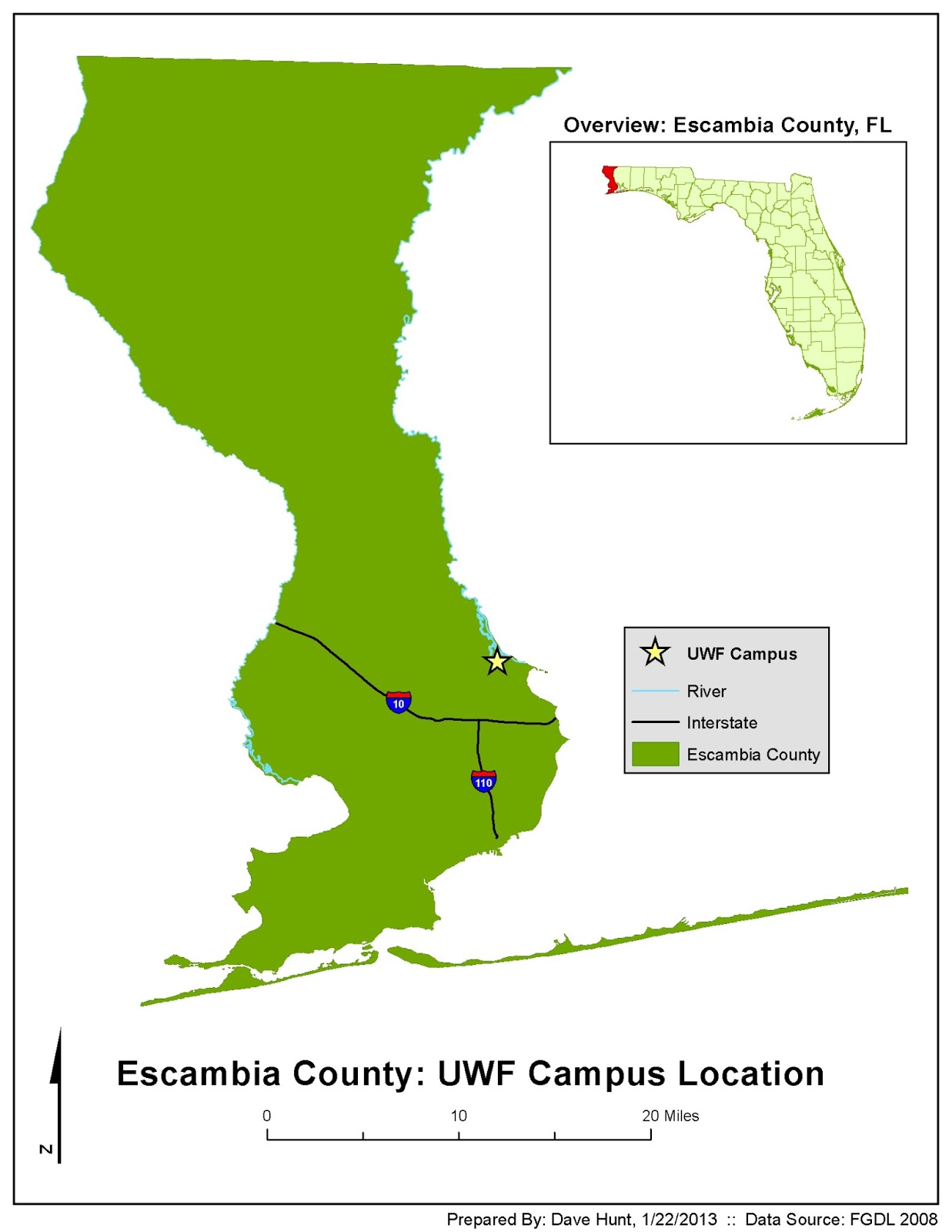
UWF Location in Escambia County Map


This week we practiced using the "essential elements" that we'll use on all maps going forward (legends, titles, scale, North arrow, border, name/date/source). We also learned useful functions like clipping one layer  with another shapefile.  I'm pretty happy with this map - I think it looks clean and the eye is drawn to the main point of the map (the location of UWF within Escambia County).  Color choices will be a point of weakness for me in this course, so I'm trying to keep it pretty simple.

Saturday, January 12, 2013

ArcGIS Overview


ArcGIS Overview - World Map Exercise


Our first assignment in Intro to GIS involved presenting a world map highlighting country populations and major cities.  We also added informational elements (legends, N indicators, scale bar, title and informational text) to the map.  It was a good orientation to many common ArcGIS features.