Showing posts with label GIS5103. Show all posts

Friday, August 2, 2013

Sharing Tools


Our final assignment involved updating a script and creating a toolbox with an embedded script.  We modified an existing script to use the sys.argv arguments instead of GetParameters. We also added descriptive help text and finally embedded the script securely within the tool (with a password). The end result was a tool that can be shared as one file, reducing management issues for users.

A good finale to the class as we will, hopefully, expand on our Python and ArcGIS skills and be prepared to create new tools and share them with the ArcGIS community.

Thanks for the class!  I learned a lot.  I'm mostly interested in GIS from a landscape archaeology point-of-view, so learning various ways to automate geoprocessing and working rasters will likely have a strong presence in my future.

Friday, July 26, 2013

Creating Custom Tools


Pretty easy (if you do the exercises) and useful lab this week.  We took an existing script that will clip multiple input files and turned it into an ArcGIS tool.  First we created a toolbox in ArcCatalog and added a new script tool to the toolbox.  Then we associated the tool with our existing script.  We needed to make a couple modifications to the script to connect the tool's input fields with inputs that the script needed.  Finally we modified the script's print messages into arcpy.AddMessage() so the messages would appear in the dialog's own message space.

Overall, pretty quick but a good basis for how to make ArcGIS custom tools in the future.

Wednesday, July 17, 2013

Debugging and Error Handling


This week's assignment covered debugging and error handling.  This is a topic that is useful in any form of programming, not just when writing GIS scripts.  Our first exercise (above) involved correcting some syntax errors in a simple script that reads out the names of various airports in a shapefile.  Nothing too difficult here and the IDE that I use (PyCharm) helps point out many of those errors.


The second part of the assignment similarly needed corrections.  This script used some of the functions we learned last week in the Map Scripting module, so it was interesting to try to find the syntax errors in that code which we've not used much.


Finally, the grads had the chance to implement a couple try-except statements on code that contained errors. We didn't fix the errors, but implemented the try-excepts so that the code would still run, even if it ran into a problem.  This is a super useful tool to have as the exception can return good information about the error and prevent things from running off the rails entirely.  

Overall, a good week, lots of useful tools for the toolkit.

Sunday, July 14, 2013

Geometry and Rasters


We're starting to get into the nuts and bolts of reading and writing feature classes now. Part 1 of the assignment this week involved reading out the components of a shapefile and writing those to a text file.  This was a pretty straightforward assignment, though there are some subtleties with getting the "parts" of the geometry out of the shapefile.

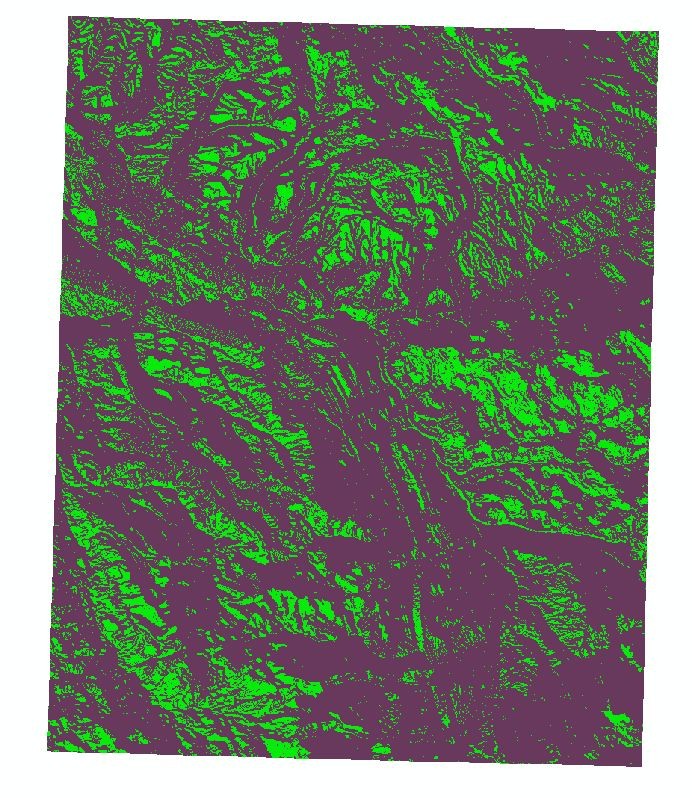
Part 2 involved working with rasters.  I really wish we had more time for this topic as I think I will be working with rasters a lot in the future and I feel like we are only scratching the surface here.  The goal was to read in a raster and then apply various raster functions (slope, aspect - with varying conditionals) to create a new raster based on the combination of temporary rasters.  The end result appears above.

Finally, for grad students, Part 3 involved reading in the "parts" that we originally wrote out to a text file in Part 1 and build a new feature class.  This was actually pretty challenging.  While my code works and appears to match the desired outcome, I'm not completely happy with it.  One thing I don't understand is why the rows in the attribute table do not match the order that they are read in (and the order of the OID that they had in the text file).  I imagine there is some sort of object referencing/ordering going on that is outside our control, but it is somewhat troubling not having that level of control.  Overall, a good assignment this week and exposed a lot of the power of arcpy and GIS programming.

Saturday, June 29, 2013

Week 6: Exploring and Manipulating Spatial Data


This week's assignment focused on exploring and manipulating spatial data.  We created a new geodatabase via our script and then populated it with feature classes created from existing shapefiles.  Then we were introduced to cursors.  We created a SearchCursor along with a snippet of SQL to find the cities that are county seats in the cities feature class.  Finally, we populated a dictionary with city:population key:value pairs derived from our county seat query.

All and all a pretty straightforward lab. The only thing that really hung me up was forgetting to delete the cursor (which locked the gdb and caused me to wonder why my env.overwriteOutput=True wasn't working).

Thursday, June 20, 2013

Module 5 - GIS Programming


This week we started into actually using Python to drive functions within ArcMap.  This exercise got us started on setting up a good script template with the relevant imports, environment setup, and printing out messages from completed functions.  We ran three different functions: AddXY_management, Buffer_analysis, and Buffer_analysis with dissolve turned on.  All in all, things went well this week and the results are shown above.

Monday, June 10, 2013

Participation Discussion

Photogrammetry is the technique of creating a 3D model (or topology) from a series of photographs. Basically, you take a series of photos of your subject from varying angles. The object being modeled can be small (I have done it with the skull of an extinct animal) to a landscape (the biggest I have done is my backyard, but it can be done at a very large scale).  From this series of photos, computer software is used to determine the shape of the object by comparing the same points in different shots and the various angles of focus.  The result is a "mesh" or 3D model of your object.

Below is a very low resolution example of a photogrammetric model of a garden in my backyard created by taking about 50 images around the bird bath in the photo. It is a wire-frame model that can be fully rotated.


This article discusses the intersection of photogrammetric modeling and GIS.  Just like geolocating a raster or historical image to a map, we can now geolocate a 3D mesh to a map.  The uses of this will be many, but I am particularly interested in how it can be used in archaeology.  Imagine being able to go out to a complex archaeological site (like a pueblo house structure), spend the day taking lots of photos from every conceivable angle, and then building a 3D model from those photos and plopping it directly into a map.  It will be an amazing way to capture data and even to compare sites over time.  And it won't be just for archaeology but environmental work, urban planning, pretty much anything you can imagine as a 3D model that you need to analyze spatially.
Photogrammetric Modeling + GIS by Rachel Opitz and Jessica Nowlin, 2012, ERSI News

Wednesday, June 5, 2013

Python Basics II


We continued with our intro to the basics of the Python language.  This week we played a little with lists and then also started with the various iteration methods.  We used a while loop to create a list of random numbers and also to control a block of code that looked for a specific number and removed all instances of it from the list. I also learned that you can't delete items from a list while you're iterating over the list itself (as in for eachitem in myList).  That makes sense, but it also feels like a natural approach (one that I found a large number of people asking about on OverStack).

Tuesday, May 28, 2013

Python Basics I


We started into the Python language this week.  I've been programming for many years, so this week's exercises were pretty easy for me.  However, I would encourage my GIS classmates who aren't familiar with programming to spend some time on the exercises. We're covering really important basics in programming for any language.  Fortunately, Python has pretty easy syntax, so once you get the basic flow of it, you can solve a lot of problems just by looking through the various methods and functions that are available for each data type.

The image above is my results from the lab exercise.  In Part 1 of the lab, we calculated the length of our last name and then multiplied that value by 3.  In Part 2 (grad students), we had to calculate the number of times the letter "e" appears in our middle name and then divide it (as a float) by the number of letters in our middle name.  Unfortunately, there are no e's in "Brian" so my result is a little boring.

Wednesday, May 22, 2013

Geoprocessing


This week we got our first chance to play with ArcMap Model Builder, create some scripts using the ArcGIS tools, and add a tool to our own custom toolbox. Overall, pretty straightforward, no hiccups.  Looking forward to getting into more Python scripting.

The image above is the result of running my SoilErase tool.  This tool selected the area that is "not prime farmland" from the input soils shapefile and then erases that area from the basin shapefile.  The result is the land in the basin that IS prime farmland.  Build your farm there in the green area!

Friday, May 17, 2013

GIS Programming - Week 1


GIS Programming began this week with some simple exercises introducing a couple different Python development environments.  We sampled the IDLE and PythonWin tools.  The assignment culminated with running a script that built out the folder structure for the semester on our individual S: drives.  The image above is the end result of that script on my own drive.

Running the script simply involved opening the CreateModuleFolders.py script in PythonWin and running it.

Looking forward to actually writing some scripts in the coming weeks.